

While social media marketing was once dismissed as a fleeting fad, businesses today with a strong social media presence are seeing very real benefits by consistently interacting with their customers and getting in touch with them online as opposed to through a traditional brick and mortar store, hard copy mailings or phone calls.

Is your company on Facebook?
According to Forbes, there are 10 ways businesses benefit from a solid social media marketing campaign:
- Increased Brand Recognition
- Increased Brand Loyalty
- Increased Sales Conversion Opportunities
- Higher Conversion Rates
- Establishing Higher Brand Authority
- Increased Inbound Web Traffic
- Lower Marketing Costs
- Higher Search Engine Optimization (SEO) Ranking
- More Personal Customer Experience
- Improved Customer Insights
How can you get started as a business on social media? The first step is setting up profiles on the major social channels of your choice. The most popular ones are Facebook, Twitter, Google+, LinkedIn and Pinterest. This post shares several tips, tricks and must-haves for getting your company set up on Facebook; read on.
Why Facebook? A Look at Demographics
Facebook is the biggest social network around, boasting more than 1.39 billion active monthly users. Unlike many social networking sites with a larger teen internet presence, Facebook’s main demographic is users in their 20’s and 30’s. Here are some interesting statistics about users on Facebook from Business Insider and The Pew Research Center:
- 69% of people with an annual income higher than $75,000 visit the site.
- The time of highest traffic on Facebook is 1-3pm, mid-week.
- The average person on Facebook has 300 friends.
- Fan engagement is 18% higher on Thursdays and Fridays.
- 5 new profiles are created every second.
- Users spend an average of 20 minutes on the site.
- Facebook is responsible for 1 out of 5 page views on the internet.
- Facebook reported an increase in user engagement in 2014 from 63% to 70%.
- 68% of college-educated internet users visit Facebook monthly.
- 71% of U.S. adults online use the network.
- 60% of users are women.
- 64% of users log on every day.
- 45% access the site several times per day.
As you can see, these statistics are impressive and your company will benefit by incorporating a social media marketing strategy. By setting up a business profile, your company will see increased brand awareness, name recognition and customer loyalty.
While there are advantages to each major social media platform and being on every channel can have its benefits, you should never take on more than you are prepared to handle. If you only have time to maintain, monitor and refresh 1-2 profiles each week, you shouldn’t open accounts everywhere all at once. Start small and consider hiring a social media pro to help you get the most of each site.
5 Helpful Tips and Tricks for Facebook
Share Useful, Engaging Content
Social media is great for connecting businesses with customers because by nature, it’s a social interaction. Your fans are scrolling through cat videos, memes and images from their friends’ birthday parties, so in order for your business’ posts to get noticed by customers, they need to offer value and hold their attention.
If your fans are watching Buzzfeed videos on Facebook, why not create a video for your company that will fit right into their newsfeed? For example, if you’re a restaurant, create a video of a popular meal being prepped, cooked and served. For bonus points, give your fans the recipe and let them cook alongside you.
Are you afraid that sharing this video means you’ll lose their business? The simple answer is no; they will now see your company as a brand authority and a trusted industry leader, and will show up hungry at your restaurant the next time they don’t want to cook for themselves.
Post When Your Audience is Active
It doesn’t make sense to invest time and resources into posting on social media when there’s no one around to view your updates. Equivalent to giving a sales pitch to an empty conference room, you’ll find that your efforts aren’t successful. Instead, share your helpful and engaging content when your audience is most active. According to a recent article by Hootsuite, the best times to post on Facebook are:
- Thursdays and Fridays, either at1 p.m. for the most shares, or 3 p.m. for the most clicks. – (stats via Quick Sprout)
- Mondays through Thursdaysbetween 6 p.m. and 8 p.m. – (stats via Optimizely)
- Thursdays and Fridays from 1 p.m. to 3 p.m. – (stats via Microsoft)
- Thursdays and Fridays from 1 p.m. to 3 p.m. – (stats via Hubspot)
Schedule Your Posts Ahead of Time
It isn’t realistic for a business owner to sit on Facebook and post updates one by one, many times during non-business hours. In order to get your updates in front of your audience when they are most active, take advantage of scheduling tools that allow you to get posts queued to publish ahead of time. Some of the best are Sprout Social and Hootsuite; Facebook even has a built-in scheduling tool for company pages.

Do you schedule posts ahead of time?
Get Insight from Your Customers
One of the most valuable aspects of having a business Facebook page is the opportunity to see what customers are saying about you. Facebook is not just about connecting and engaging, but it’s also about feedback and can be a way to thank and show your gratitude to customers. Monitor the progress of your updates by using the Insights tab and pay attention to which posts receive the most likes, shares and clicks. Use this info to better tailor your future updates to take advantage of positive momentum.
You can also offer special promotional deals through Facebook or provide discounts to those who Like your page; you are both encouraging interaction and rewarding your customers at the same time!
Update Your Profile Often
It’s important to keep your business page freshly updated with the latest news about your company and relevant new content. Hootsuite’s advice is to, “Set yourself a reminder to check your profile information every couple of weeks, and don’t ignore it.” They also discuss the merits of keeping your images fresh and exciting:
“In the same vein, regularly changing cover photos keeps your profile interesting to existing followers and gives you an opportunity to re-engage people who weren’t impressed the first time. Meanwhile your static profile picture will help you maintain brand recognition and consistency across networks.”
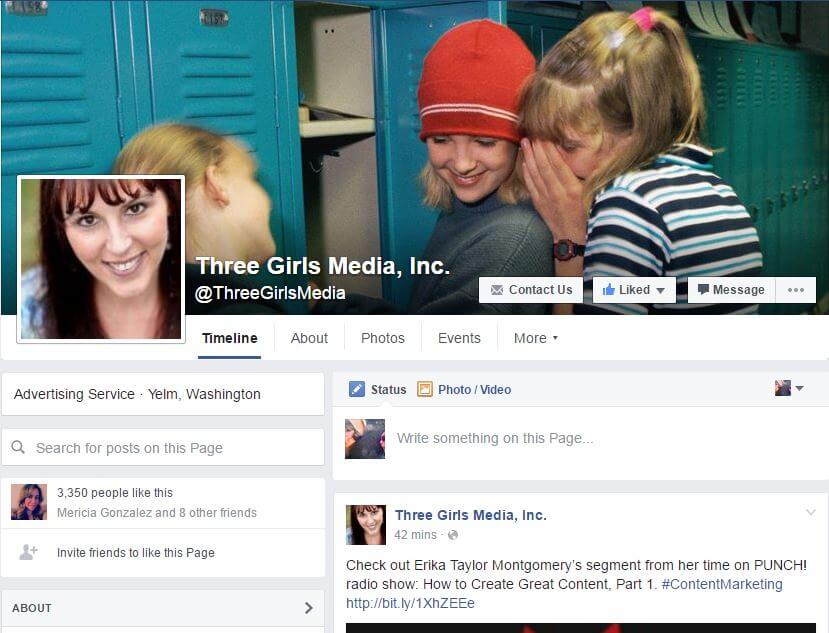
It’s important to keep your business page freshly updated.
Facebook Must-Haves
A Great Cover Photo:
While your cover photo certainly isn’t the most important part of your company’s page, it is your first chance to make a good first impression. The cover photo should be eye catching (as readers are likely to see it when they first visit your page) and in line with your company’s brand. Read this article for some good examples.
Consistent Brand Language:
Come up with a standard tagline for your company and use similar language in every section of your company page. Consistency is key!
Your Company Logo:
If you aren’t using your logo for your profile picture, try incorporating it into your cover photo by using a simple image editing program like Canva; they offer pre-sized images you can edit for each major social media platform, or you can upload your own.
Contact Information:
If customers like your brand and want to purchase your products or services, they need to know how to contact you! Fill out the Call-To-Action section on Facebook and direct them straight to a landing page allowing them to place an order. Also, share your company phone number, email address and website in the About section.
Advertising on Facebook
Many small businesses who have used Facebook advertising credit it with significantly helping their growth and brand recognition. Facebook has two different advertising options businesses can take advantage of to increase their visibility on the social network. They are Boosted Posts and Promoted Posts. This article has some tips for boosting a Facebook post. Not sure whether you should boost a post or promote it? The two options can be confusing. Social Media Examiner has some great advice for choosing which is right for you.
Getting Verified on Social Media
Sites like Facebook and Twitter offer verification for brand pages; this comes in the form of a blue checkmark next to the business’ name. Many marketers take advantage of this feature as it helps customers avoid scams by proving to your audience that your page is the official profile of your company or brand. Learn more about Facebook verification here.
We love assisting our clients and helping build their online image; contact us today. Also, stay tuned for my follow up blog post where I will share some tips and tricks for Twitter, Google+, LinkedIn and Pinterest. In the meantime, check out these helpful articles:
- Facebook Marketing for Small Businesses
- How to Boost a Facebook Post [Advertising Guide]
- 3 Ways to Get the Most Out of Facebook for Business
- Facebook Posts Linked with Twitter: Just Say No!
- Facebook Fans: Why Don’t They Like Me?
[getCallout slug=”default-callout”]